
Event calendar guidelines
Publish date: 5 October 2026
What events can be published in the calendar? How do I make the best event post possible? This is where we answer your questions!
👍Is my event suitable for the calendar?
Events must…
- be conducted in accordance with applicable laws and that all necessary permits are in place.
- take place in the Stockholm region
- be open to everyone: The event must be public.
- have a set time: Date and time must be included.
❌We don’t publish:
- Happy hour, after-work drinks (Swedish: AW) and similar offers/promotions
- Exceptions:
- if combined with an experience e.g. live music, guest speakers, etc.
- if the event is a social meetup where the organizer is not the establishment
- Exceptions:
- Hotel offers and packages in Stockholm (e.g. discounted stays or package deals at hotels in the city).
- Exception: outings and experiences in the Stockholm archipelago that include an overnight hotel stay may be included – for example, if the package contains a clear programme or an experience visitors can take part in (guided tours, dinner evenings, themed weekends, etc.). A room discount alone is not sufficient.
- Private appointments where visitors choose the time themselves, e.g. “book a guided tour whenever you like”.
- Secondary-market ticket resellers.
We strive to link to the event organiser's official ticket sales, not to operators who resell tickets.
- Members-only meetings
- Political party-meetings (rallies, election campaigning).
- Charity/fundraising events may be okay.
- Religious meetings and services
- Exception:
- activities (concerts, flea markets etc.) arranged by religious groups are welcome.
- Exception:
- Outside the Stockholm region
- Courses/education with multiple sessions – single workshops are ok
Questions? Contact us at red@visitstockholm.com
⚙️How to fill out the form
I. Text
1. Title – short and descriptive
Keep it short and sweet – so that visitors can either click through to read more or keep scrolling.
2. Description
Keep it brief! 3–6 sentences is enough – for details, visitors are directed to your site.
❌NOTE! Please remove:
Vague wording like “amazing”, “magical”, “wonderful”, etc.
Emojis
Prices – refer to your site for prices.
Time & place – fill in the dedicated fields in the form instead.
“We/us” as the organizer
Remove “we” and “us” from the text – if not, visitors think that Visit Stockholm/SBR is the organizer. For example:
Instead of...
- “we’ll take you on a walking tour”
or - “join us…”,
...write:
- “City guide Sara shows you Old Town”
or - “on this walk through Old Town, you will experience…”
3. Dates
Fill in the correct dates. For example:
if you are closed on certain days, e.g. Mondays,
fill in all dates except Mondays, e.g. date range Tuesday-Sunday.
for recurring events:
fill in the days as several individual dates, not as a continuous date range – otherwise your event will appear on the wrong days in the calendar.
Be sure to enter correct dates
– if you’re closed on Mondays, enter all dates except Mondays.
II. Image
1. Image format
File type: JPG or PNG.
Max size: 5 MB.
Always include photographer credit.
Landscape format is better than portrait.
2. Image content
- large, poster-style images with text = hard to read
- Simple, zoomed-in images with few details and little or no text = good!
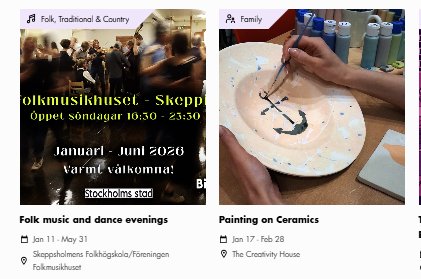
Pictured: Images are cropped in the calendar as squares.
❌NOTE! Please remove:
- Vague wording like “amazing”, “magical”, “wonderful”, etc.
- Emojis
- Prices – refer to your site for prices.
- Time & place – fill in the dedicated fields in the form instead.
- “We/us”
Remove “we” and “us” from the text – if not, visitors think that Visit Stockholm/SBR is the organizer. For example:
Instead of...
- “we’ll take you on a walking tour”
or - “join us…”,
...write:
- “City guide Sara shows you Old Town”
or - “on this walk through Old Town, you will experience…”
3. Dates
Fill in the correct dates. For example:
if you are closed on certain days, e.g. Mondays,
fill in all dates except Mondays, e.g. date range Tuesday-Sunday.
for recurring events:
fill in the days as several individual dates, not as a continuous date range – otherwise your event will appear on the wrong days in the calendar.
Be sure to enter correct dates
– if you’re closed on Mondays, enter all dates except Mondays.
II. Image
1. Image format
File type: JPG or PNG.
Max size: 5 MB.
Always include photographer credit.
Landscape format is better than portrait.
2. Image content
- large, poster-style images with text = hard to read
- Simple, zoomed-in images with few details and little or no text = good!
Pictured: Images are cropped in the calendar as squares.